
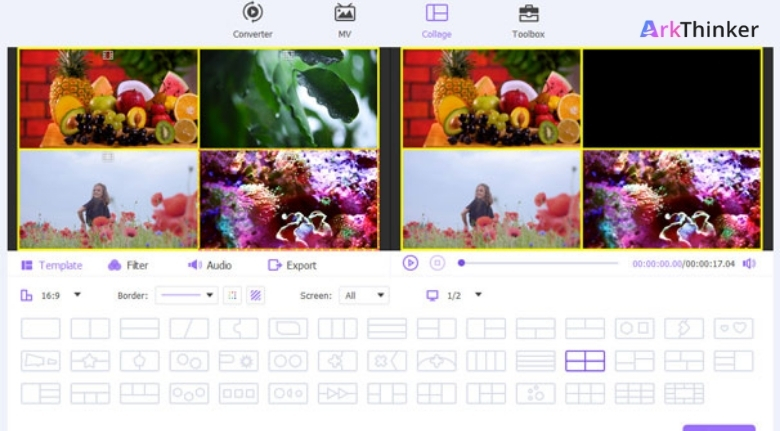
Creating and managing digital content has become part of everyday life for professionals, students, creators and businesses alike. Whether you are editing videos for social media, converting media files, recording tutorials or restoring old footage, using multiple software programs for every task can quickly become time-consuming. Modern AI-powered multimedia tools simplify these workflows by combining several features into a single platform, allowing users to complete projects faster while maintaining professional results.
ArkThinker offers a wide range of AI-powered multimedia solutions, including video conversion, screen recording, video repair, image enhancement, watermark removal, audio tools and online utilities. The platform supports Windows, Mac and browser-based tools, making it suitable for content creators, educators, businesses and everyday users. New users can explore free online tools, while premium software frequently includes 7-day free trials, 40–50% discounts on selected annual plans, bundle offers and a 30-day money-back guarantee on eligible purchases.
Instead of spending time learning multiple complicated programs, choosing an all-in-one solution helps streamline your workflow while allowing you to focus on creativity rather than technical challenges.
Choose Tools That Solve Multiple Problems
Many people install separate software for converting videos, recording screens, editing audio, compressing files and repairing damaged media. Managing numerous applications increases storage usage and makes projects more complicated than necessary.
With ArkThinker, users can access multiple multimedia tools within one ecosystem, including video converters, screen recorders, AI image enhancement, video repair and online editing utilities. Having related features available together reduces the need to switch between different programs while improving productivity.
Before downloading new software, identify the tasks you perform most often. If you regularly convert videos, edit presentations, record tutorials or improve old images, selecting software that combines these functions often provides greater long-term value.
Compatibility is equally important. Choosing tools that support common file formats and modern codecs helps ensure your projects remain accessible across different devices and platforms.
Let AI Handle Repetitive Editing Tasks
Artificial intelligence has transformed multimedia editing by automating many repetitive processes that previously required significant manual effort. Features such as AI upscaling, video enhancement and intelligent repair allow users to improve media quality with fewer manual adjustments.
Using ArkThinker, creators can enhance videos, upscale images, repair damaged files and optimise multimedia content through AI-assisted technology while maintaining control over the final result. These features are particularly valuable for content creators who publish videos regularly and want to reduce editing time.
AI works best as a productivity assistant rather than a replacement for creativity. Allowing software to complete repetitive technical work gives you more time to focus on storytelling, design and audience engagement.
Saving customised presets for frequently used export settings also speeds up future projects. Once you establish a workflow that produces consistent results, repeating it becomes much easier.
Build an Efficient Content Creation Workflow
Successful creators often produce content consistently rather than relying on occasional bursts of productivity. Building an organised workflow makes every stage—from recording to editing and exporting—more efficient.
ArkThinker provides video conversion, screen recording, image enhancement, online editing tools and multimedia utilities that help simplify production from beginning to end. The platform also regularly offers software discounts, bundle pricing, annual license promotions, lifetime licenses on selected products and free online tools for users who want to explore its features before purchasing. Current offers include up to 50% off selected licenses and 7-day trials for certain products.
Organize Your Digital Files More Efficiently
Managing digital files becomes increasingly difficult as videos, photos and documents accumulate over time. Without a clear organization system, valuable files can be difficult to locate, leading to wasted time and unnecessary frustration. Establishing a consistent file management routine helps improve productivity while making creative projects easier to manage.
With ArkThinker, users can access video converters, screen recording software, image enhancement tools, file repair solutions and online utilities that simplify everyday multimedia tasks. Keeping project files organised into clearly labelled folders allows these tools to fit naturally into a more efficient workflow.
Creating separate folders for raw footage, edited versions, exported files and backups also helps prevent accidental deletion or confusion when working on multiple projects. Good organisation becomes even more valuable as your digital library continues growing.
Regularly deleting unnecessary duplicate files and archiving completed projects also frees storage space while making active projects easier to locate.
Improve Content Quality with AI-Assisted Editing
Artificial intelligence has transformed many creative workflows by simplifying repetitive editing tasks. While AI cannot replace creativity, it can help improve image quality, enhance videos and speed up editing processes that previously required significant manual effort.
Using ArkThinker, creators can enhance images with AI, convert multimedia files, repair damaged videos, record screens and edit media using desktop software and online tools designed for different skill levels. These capabilities help content creators focus more on storytelling and less on technical challenges.
Before publishing content, always review AI-assisted edits manually. Small adjustments to colour, cropping, subtitles or audio often create a more polished final result while ensuring the output matches your creative vision.
Combining AI assistance with your own editing decisions usually produces stronger and more natural-looking results than relying entirely on automated processing.
Shop Smart and Choose the Right Software Plan
Creative software should match your actual workflow rather than simply offering the largest collection of features. Comparing subscription options, lifetime licenses and promotional bundles allows users to invest in tools that provide long-term value.
Throughout the year, ArkThinker offers desktop software, free online multimedia tools, 7-day trials on selected products, discounted annual and lifetime licenses, software bundles and promotional pricing on products such as Video Converter Ultimate and Screen Recorder. Reviewing current offers before purchasing helps users select solutions that fit both their creative needs and budget.
It is also helpful to start with free online tools whenever possible. Testing features before upgrading to premium software allows you to determine whether advanced capabilities genuinely support your projects.
Investing gradually in software that solves real problems is often more effective than purchasing numerous applications that remain unused.
Build a Creative Workflow That Saves Time
Whether you create videos for social media, edit family memories, prepare business presentations or manage professional multimedia projects, an organised workflow makes every task more efficient. Choosing reliable software, maintaining organised files and using AI responsibly helps improve both productivity and content quality.
ArkThinker provides multimedia solutions for video conversion, screen recording, AI image enhancement, file repair and online editing tools designed to simplify digital content creation. By combining practical software with thoughtful organisation and consistent editing habits, users can complete projects faster while maintaining professional-quality results.
The best creative workflow is one that allows technology to support your ideas instead of slowing them down. With the right tools and organised habits, every project becomes easier to manage from the initial concept to the final export.
